OpenAI의 gpt-oss 모델에 이어, RAG (검색 증강 생성)에서 매우 중요한 역할을 하는 임베딩 모델을 Google에서 새롭게 오픈 소스로 공개헀습니다. EmbeddingGemma라는 이름의 임베딩 모델로, 고성능 하드웨어 없이도 RAG를 구현할 수 있으면서, 한국어, 중국어, 일본어를 포함한 수많은 언어를 지원하도록 개발된 모델이어서 의미가 있습니다.
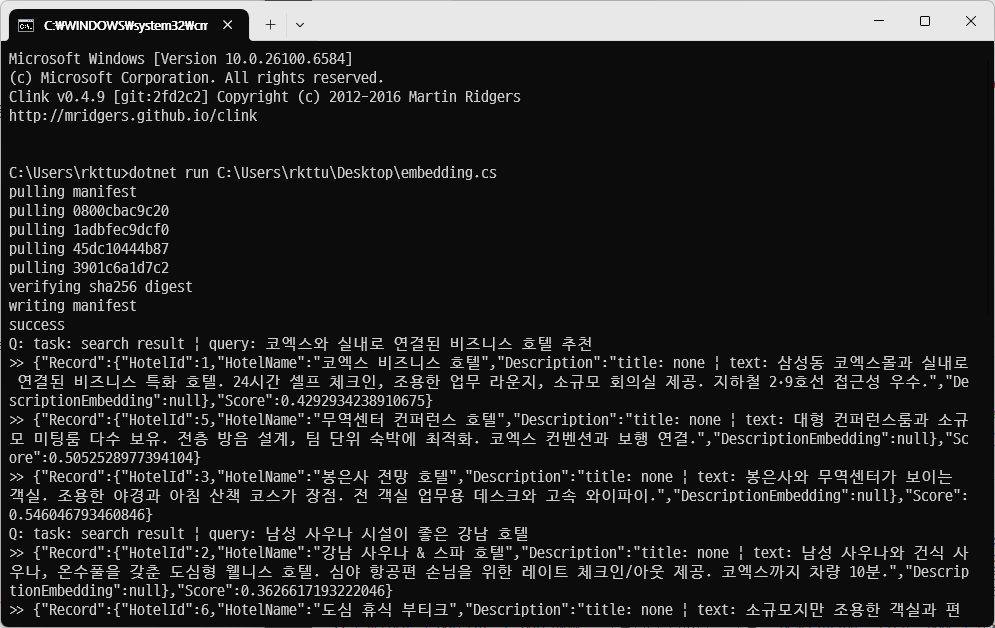
그래서 재빨리 File-based App과 Semantic Kernel용으로 개발된 sqlite-vec 확장 모듈을 붙여서 프로토타입 코드를 만들어봤는데, 잘 작동하는 것 같네요! 
참고로, | 기호나 query: 같은 라벨은 엄격한 의미의 문법은 아니고 EmbeddingGemma가 동작하는 방식에 맞춰주기 위한 부분이라고 합니다. (https://ai.google.dev/gemma/docs/embeddinggemma/inference-embeddinggemma-with-sentence-transformers 참조)
#:property PublishAot=False
#:package Microsoft.SemanticKernel.Connectors.SqliteVec@1.65.0-preview
#:package OllamaSharp@5.4.4

using System.Text.Encodings.Web;
using System.Text.Json;
using Microsoft.Data.Sqlite;
using Microsoft.Extensions.VectorData;
using Microsoft.SemanticKernel.Connectors.SqliteVec;
using OllamaSharp;
using OllamaSharp.Models;

using var cts = new CancellationTokenSource();
var cancellationToken = cts.Token;

// NOTE:
// | 기호를 써서 문자열 내부에서 시맨틱 필드를 나누는 것, 그리고 task:/query:/title:/text: 같은 라벨을 따로 쓰는 이유는 EmbeddingGemma의 동작 방식에 기인합니다.
// 상세한 내용 보기: https://ai.google.dev/gemma/docs/embeddinggemma/inference-embeddinggemma-with-sentence-transformers

var hotels = new[]
{
    new Hotel {
        HotelId = 1,
        HotelName = "코엑스 비즈니스 호텔",
        Description =
        "title: none | text: 삼성동 코엑스몰과 실내로 연결된 비즈니스 특화 호텔. 24시간 셀프 체크인, 조용한 업무 라운지, 소규모 회의실 제공. 지하철 2·9호선 접근성 우수."
    },
    new Hotel {
        HotelId = 2,
        HotelName = "강남 사우나 & 스파 호텔",
        Description =
        "title: none | text: 남성 사우나와 건식 사우나, 온수풀을 갖춘 도심형 웰니스 호텔. 심야 항공편 손님을 위한 레이트 체크인/아웃 제공. 코엑스까지 차량 10분."
    },
    new Hotel {
        HotelId = 3,
        HotelName = "봉은사 전망 호텔",
        Description =
        "title: none | text: 봉은사와 무역센터가 보이는 객실. 조용한 야경과 아침 산책 코스가 장점. 전 객실 업무용 데스크와 고속 와이파이."
    },
    new Hotel {
        HotelId = 4,
        HotelName = "테헤란로 이코노미 호텔",
        Description =
        "title: none | text: 합리적 가격의 깔끔한 비즈니스 객실. 간단 조식과 세탁실 제공. 선릉역/삼성역 도보권으로 출퇴근 수요에 적합."
    },
    new Hotel {
        HotelId = 5,
        HotelName = "무역센터 컨퍼런스 호텔",
        Description =
        "title: none | text: 대형 컨퍼런스룸과 소규모 미팅룸 다수 보유. 전층 방음 설계, 팀 단위 숙박에 최적화. 코엑스 컨벤션과 보행 연결."
    },
    new Hotel {
        HotelId = 6,
        HotelName = "도심 휴식 부티크",
        Description =
        "title: none | text: 소규모지만 조용한 객실과 편안한 침구. 인근에 카페와 레스토랑 밀집. 심야 체크인 가능."
	},
};

var queries = new[]
{
    "task: search result | query: 코엑스와 실내로 연결된 비즈니스 호텔 추천",
    "task: search result | query: 남성 사우나 시설이 좋은 강남 호텔",
    "task: search result | query: 조용한 업무 공간과 회의실이 있는 호텔",
    "task: search result | query: 합리적인 가격의 비즈니스 호텔 (선릉역/삼성역 도보)",
	"task: search result | query: 팀 단위로 회의와 숙박을 동시에 하기 좋은 곳",
};

var embeddingModelName = "embeddinggemma:300m";
using var client = new OllamaApiClient("http://localhost:11434");
await foreach (var eachState in client.PullModelAsync(embeddingModelName, cancellationToken))
{
    if (eachState == null) continue;
	await Console.Out.WriteLineAsync(eachState.Status.AsMemory(), cancellationToken).ConfigureAwait(false);
}

var cs = "Data Source=skhotels;Mode=Memory;Cache=Shared";
using var keepAlive = new SqliteConnection(cs);
keepAlive.Open(); // 이 커넥션이 살아있는 동안만 DB가 유지됩니다.

using var collection = new SqliteCollection<string, Hotel>(cs, "skhotels");
await collection.EnsureCollectionDeletedAsync(cancellationToken).ConfigureAwait(false);
await collection.EnsureCollectionExistsAsync(cancellationToken).ConfigureAwait(false);

// 1) 호텔 설명 → 문서 임베딩
foreach (var h in hotels)
{
	var resp = await client.EmbedAsync(new EmbedRequest
	{
		Model = embeddingModelName,
		Input = [h.Description!],   // 접두사 포함된 Description
	}, cancellationToken);

	var vec = L2Normalize(resp.Embeddings[0]);     // float[] 768D 가정
    h.DescriptionEmbedding = new ReadOnlyMemory<float>(vec);

    // 예: SK SqliteVectorStore에 업서트 (메서드명은 사용 SDK에 맞춰 조정)
    await collection.UpsertAsync(h, cancellationToken).ConfigureAwait(false);
}

// 2) 쿼리 → 쿼리 임베딩 (검색 시)
foreach (var userQuery in queries)
{
    await Console.Out.WriteLineAsync($"Q: {userQuery}".AsMemory(), cancellationToken).ConfigureAwait(false);
    var qResp = await client.EmbedAsync(new EmbedRequest
    {
        Model = embeddingModelName,
        Input = [userQuery],
    }, cancellationToken).ConfigureAwait(false);
    var qVec = L2Normalize(qResp.Embeddings[0]);

    await foreach (var eachResult in collection.SearchAsync(qVec, 3, cancellationToken: cancellationToken))
    {
        var serializedJson = JsonSerializer.Serialize(eachResult, new JsonSerializerOptions() { Encoder = JavaScriptEncoder.UnsafeRelaxedJsonEscaping, });
        await Console.Out.WriteLineAsync($">> {serializedJson}".AsMemory(), cancellationToken).ConfigureAwait(false);
    }
}

static float[] L2Normalize(float[] v)
{
	double n2 = 0; for (int i = 0; i < v.Length; i++) n2 += v[i] * v[i];
	var n = (float)Math.Sqrt(n2);
	if (n > 0f) for (int i = 0; i < v.Length; i++) v[i] /= n;
	return v;
}

public sealed class Hotel
{
	[VectorStoreKey]
	public long HotelId { get; set; }

	[VectorStoreData(StorageName = "hotel_name")]
	public string? HotelName { get; set; }

	[VectorStoreData(StorageName = "hotel_description")]
	public string? Description { get; set; }

	[VectorStoreVector(Dimensions: 768, DistanceFunction = DistanceFunction.CosineDistance)]
	public ReadOnlyMemory<float>? DescriptionEmbedding { get; set; }
}
